
Other
Travel Tips
HAKONE TRIP Accommodation Booking Guide
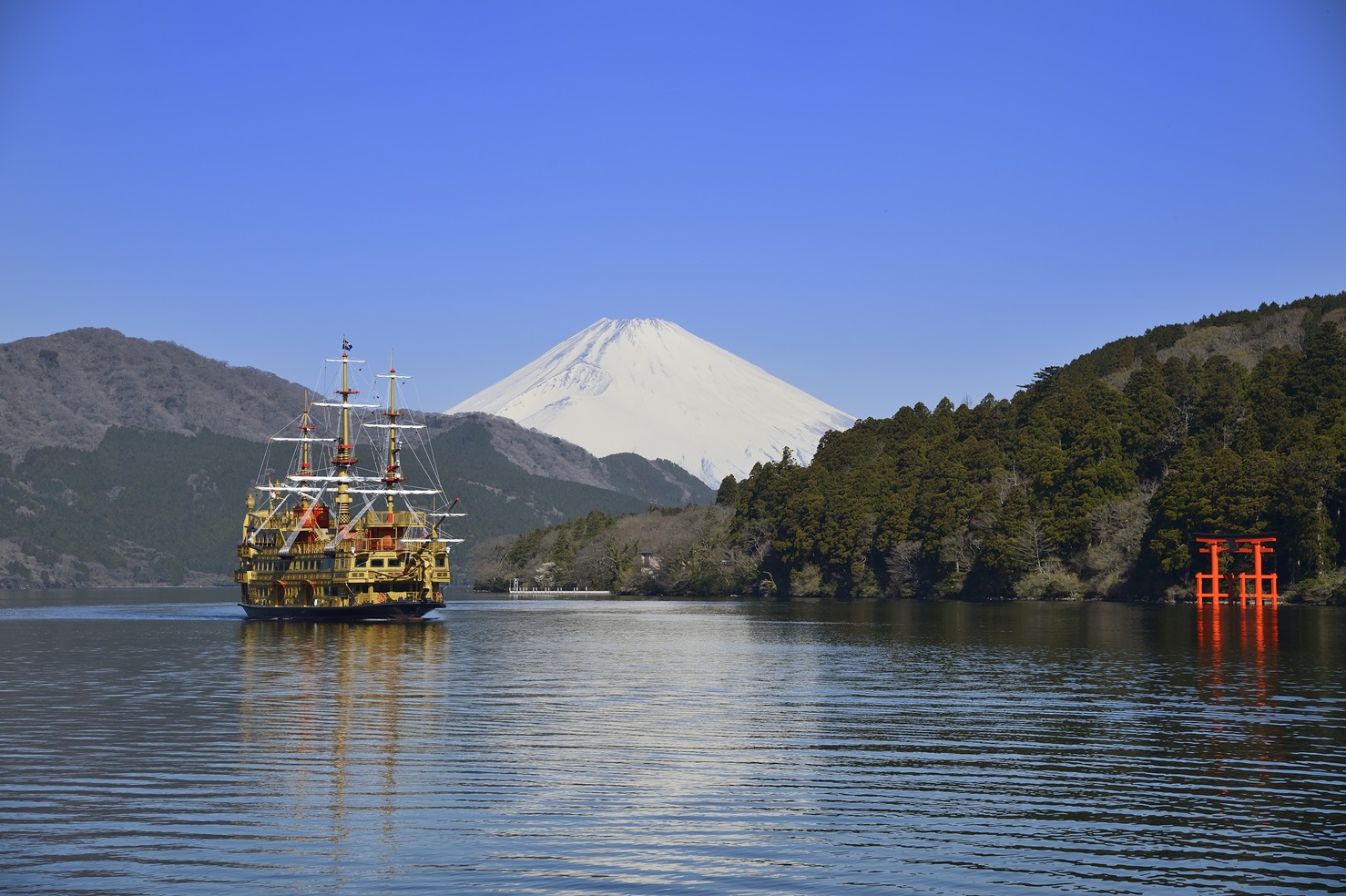
This guide explains the step-by-step booking process for "HAKONE TRIP," a accommodation reservation website for Hakone.
This website is available in English only and is designed primarily for inbound (international) travelers visiting Japan.
🛈 Came from the booking site?
You can close this tab anytime to return to your search results. Or read below to learn the booking steps.
Language: English Only
Payment Method: Online credit card payment only (prepaid)
Accepted Cards: VISA, MASTER, JCB, AMEX (single payment only)
⚠ Free Account Required
A free HAKONE TRIP account is required to complete your booking. You will be asked to log in or sign up during Step 4 (ACCOUNT) of the booking process.
To save time, you can create your account in advance. Registration takes about 2 minutes. You can also sign up with your Google, LINE, or Facebook account.
Already have an account? You can skip this step.
⚠ Important: Changes After Booking
Please be aware of the following restrictions before you book. Once a reservation is confirmed, dates, number of guests, and guest names cannot be changed. You will need to cancel and make a new reservation. Cancellation fees may apply. Same-day cancellations cannot be processed online — please contact the hotel directly by phone.
🛈 Came from the booking site?
You can close this tab anytime to return to your search results. Or read below to learn the booking steps.
This page is also available in
STEP1: Access the Booking Website "HAKONE TRIP"
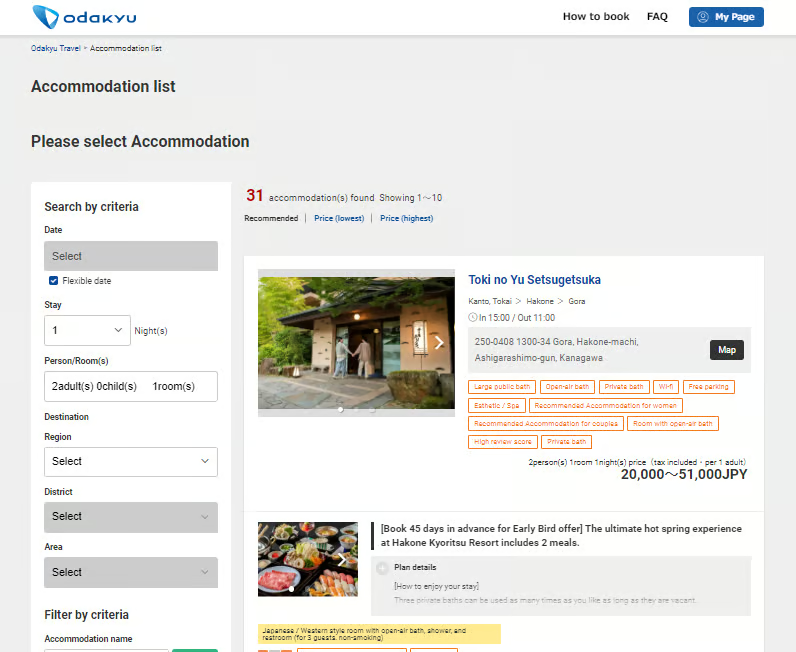
RESERVATION
Direct access from the accommodation list
or
Access via the search box on the official site
STEP2: Enter Stay Conditions and Search
SEARCH
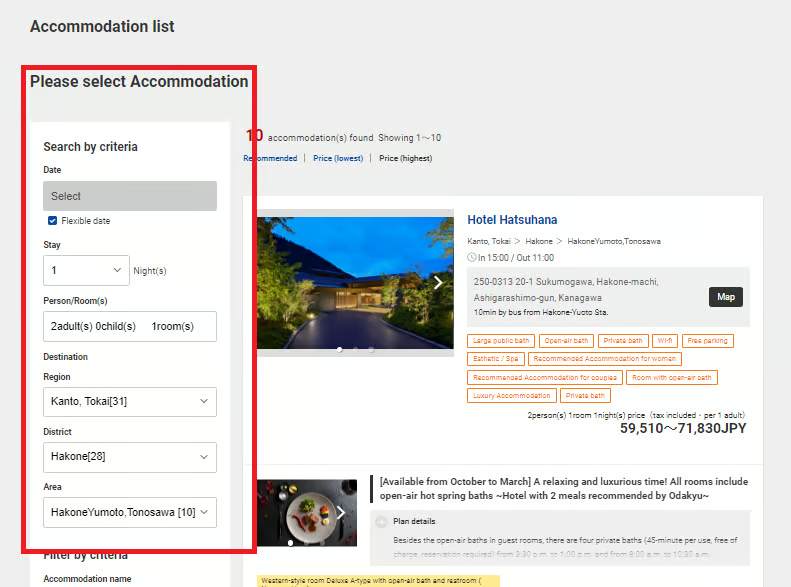
Enter your desired stay conditions in the search form on the top page.
| Check-in Date: | Select your check-in date |
| Nights: | Select the number of nights |
| Guests: | Enter the number of guests (adults/children) |
| Destinations: | Specify the area, such as “Hakone” |
☑ “Flexible date” checkbox
If you haven’t decided on your travel dates yet, check the “Flexible date” box. This lets you browse all available accommodations without selecting a specific check-in date. You can compare hotels, check locations, and explore room types first — then choose your dates later on each hotel’s detail page.
You can also search by specific hotel name or filter by facilities (hot spring, Wi-Fi, etc.).
STEP3: Select an Accommodation
SELECT
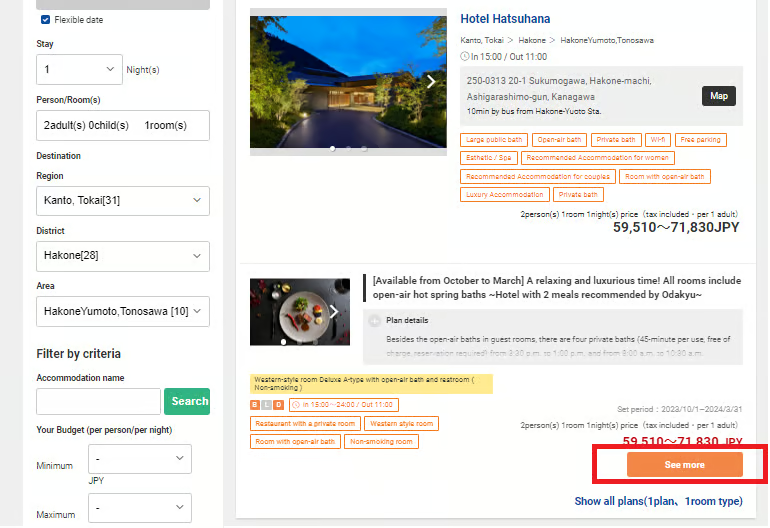
Choose your preferred accommodation from the search results list.
1
Sort Results
You can sort by Price or Recommended order.
2
Check Tags
Check the tags for each facility (e.g., Open-air bath) for helpful information.
!
Once You’ve Decided
Click the “See more” button to go to the detail page.
STEP4: Select a Plan and Date
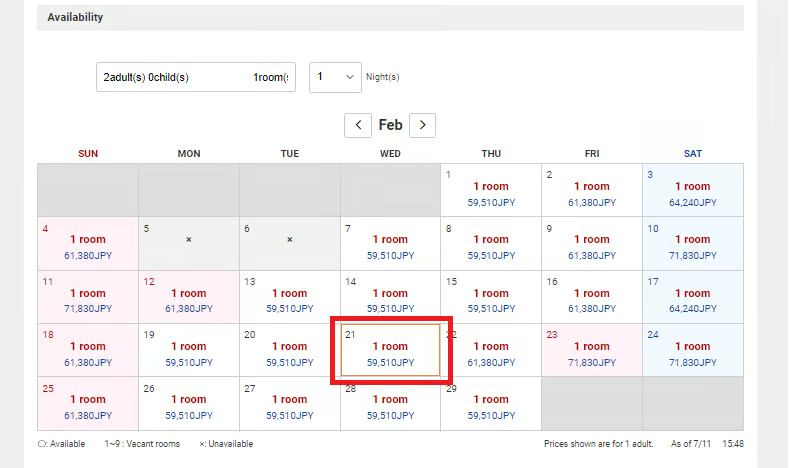
PLAN & DATE
Choose your desired plan and select a date from the availability calendar.
1
Check Plan Details
You can check room type, meal options, cancellation policy, and more.
2
How to Read the Calendar
The calendar displays the price per night and room availability.
Available
Few rooms left
Unavailable
!
Select a Date
Click on your desired check-in date to proceed to the booking process.
STEP5: Log In / Sign Up
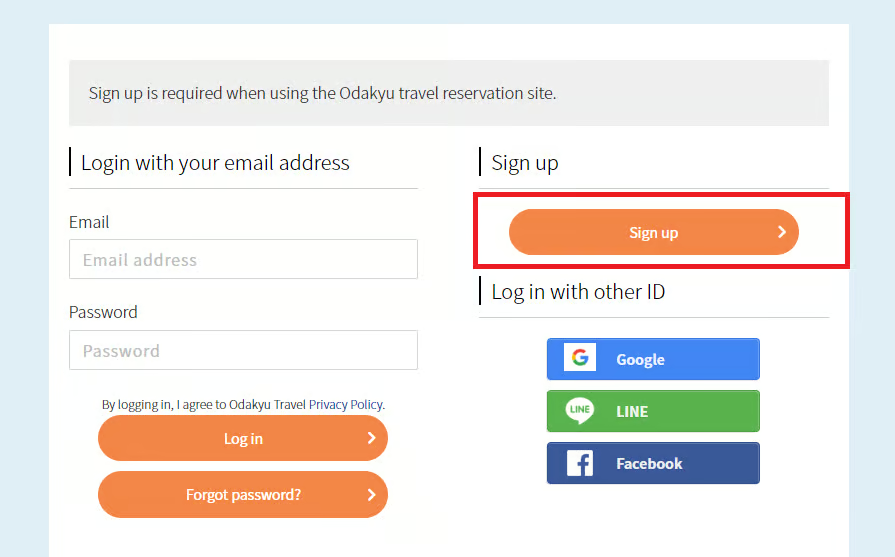
ACCOUNT
You need to log in to proceed with your booking.
New Users
Sign Up (Free)
Click “Sign up” to create a free account.
Existing Members
Log In
Log in with your email address and password.
You can also log in with external accounts
LINE
Once registered, you can easily check or cancel your bookings from “My Page.”
STEP6: Enter Booking Information
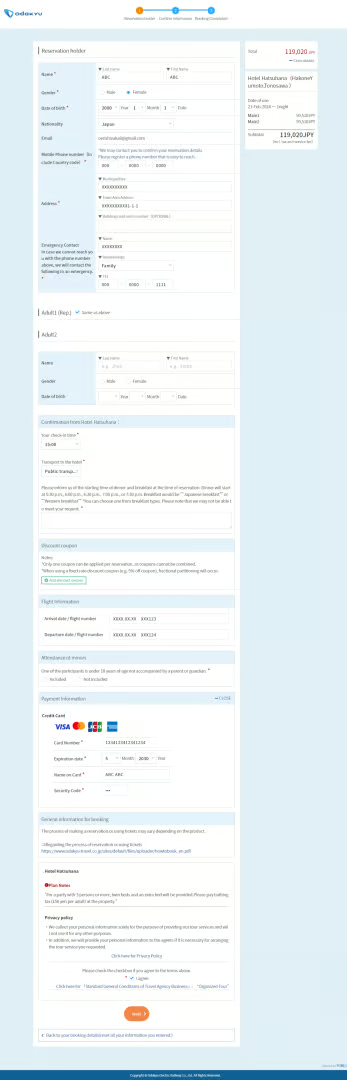
BOOKING FORM
Enter your guest information and payment details.
Guest Information
| Name | Full name |
| Gender | Gender |
| Date of Birth | Date of birth |
| Nationality | Nationality |
| Email address | |
| Mobile Phone | Mobile phone number |
Payment Information
Enter your credit card information.
MASTER
JCB
AMEX
After reviewing the entered information, click the submit button at the bottom of the page to confirm your booking.
※You won’t be charged yet.
STEP7: Review Your Booking
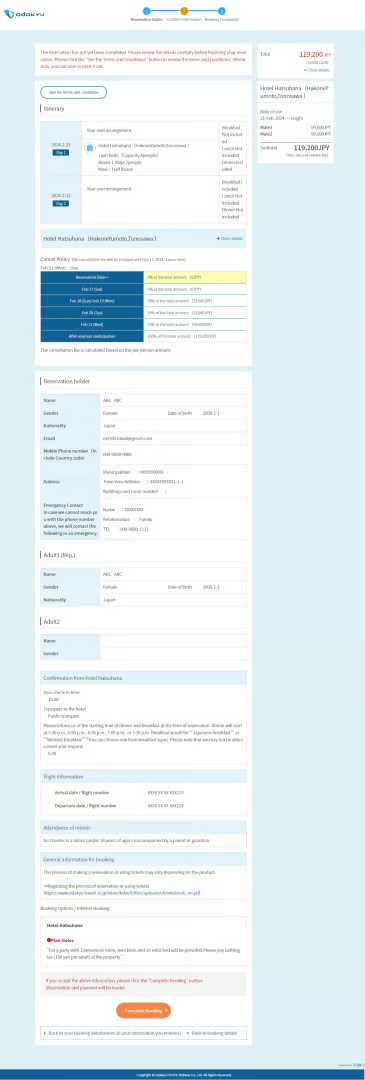
CONFIRMATION
Review the displayed booking details to make sure everything is correct.
Please verify the following items
| Accommodation | Is the selected hotel name correct? |
| Plan | Plan details (meal options, etc.) |
| Dates | Check-in and check-out dates |
| Guests | Number of adults and children |
| Total Price | Total payment amount |
!
If Everything Looks Good
Click the “Confirm” button at the bottom of the page to finalize your booking.
Changes after confirmation are subject to the cancellation policy. Please review carefully.
IMPORTANT
Before You Click “Confirm”
No date or guest number changes
Once confirmed, you cannot change check-in/check-out dates or the number of guests. You must cancel the booking and make a new reservation.
No guest name changes
The guest name registered at the time of booking cannot be changed afterward. Please double-check the name before confirming.
Same-day cancellations: phone only
Same-day cancellations cannot be processed on the website. Please contact the hotel directly by phone. Cancellation fees may apply according to the hotel’s cancellation policy.
Cancellation fees
If a cancellation fee applies, the remaining balance will be refunded to your credit card (processing based on JST). Please check each accommodation’s cancellation policy before booking.
STEP8: Booking Complete
COMPLETE
✓
A “Booking Confirmation Email” will be
sent to your registered email address.
✕
No Paper Voucher Needed
You do not need to print or bring a paper voucher (booking confirmation).
✓
Just Give Your Name at Check-in
Simply tell the hotel front desk the name on your booking to check in.
You’re ready to book!
Now that you understand the process, start searching for your perfect Hakone stay.
After Booking (Confirmation / Changes / Cancellation)
AFTER BOOKING
You can check or cancel your booking from “My Page.”
🔍
Check
You can review your booking details from My Page.
✎
Change
There is no function to change dates or number of guests. Please cancel your booking and make a new reservation.
❌
Cancel
You can cancel from My Page (please be aware of cancellation fees).
| Guest name changes are not possible. |
| Same-day cancellations cannot be processed on the website. Please contact the hotel directly by phone. |
| If a cancellation fee applies, the balance will be refunded to your credit card (based on JST). |
FAQ
FAQ
Q
Can I pay at the hotel?
A
No, accommodation fees are prepaid online only. However, bathing tax (150 JPY per person per night) and additional food/drink charges should be paid at the hotel.
Q
Can I also book Romancecar or Hakone Free Pass here?
A
No, this site is for accommodation bookings only. Please purchase transportation tickets separately through “EMot Online Tickets.”
Q
Can you accommodate food allergies?
A
For allergy accommodations or special requests, please contact the hotel directly after completing your booking.
Q
Where can I buy Discount Passes and tickets?
A
The Hakone Freepass, the Enoshima-Kamakura Freepass, the Tanzawa-Oyama Freepass and tickets for Odakyu Lines can be purchased from ticket vending machines at stations and online.
https://hakonetrip.odakyu-global.com/ticket-guide/
Q
Do I need my passport at check-in?
A
Yes. Under Japanese law (Inn and Hotel Act), accommodation facilities are required to verify the nationality and passport number of foreign guests, and to keep a copy on record. Please bring your passport when checking in.
Q
How are children’s rates defined?
A
Children’s rates and age categories vary by accommodation. Please check the details on the guest selection screen when making your reservation.
Q
What should I do if I don’t receive a booking confirmation email?
A
Please check your spam or junk mail folder first. If you still cannot find it, adjust your email settings to allow emails from our system. Then contact us via the form below so we can resend your confirmation.
Contact Us (Inquiry Form)
Q
What if I have requests or questions for the accommodation?
A
For specific requests or questions about the accommodation — such as room views, special arrangements, or facility details — please contact the hotel or ryokan directly after completing your booking.
Ready to book your Hakone stay?
You can close this tab and return to the booking site, or click below to start fresh.
If you came from the booking site, simply close this tab to return to your search results.
Related Links
RELATED LINKS
|
|||
|
|||
|
|||
|